User’s manual
Introduction
Aga8Calc is a Windows service that takes gas composition, pressure and temperature, and returns one of the Aga8 properties. It can return the following properties:
CompressibilityFactor [-]
Density [kg/m³]
Enthalpy [J/mol]
Entropy [J/(mol-K)]
GibbsEnergy [J/mol]
InternalEnergy [J/mol]
IsentropicExponent [-]
IsobaricHeatCapacity [J/(mol-K)]
IsochoricHeatCapacity [J/(mol-K)]
JouleThomsonCoefficient [K/kPa]
MolarConcentration [mol/l]
MolarMass [g/mol]
SpeedOfSound [m/s]
The gas composition, pressure and temperature are read from an OPC-UA server. The result is written back to the same OPC-UA server.
Getting Aga8Calc
The latest release version of Aga8Calc can be downloaded from: https://github.com/equinor/Aga8Calc/releases
Installation
Copy the Aga8Calc folder to C:\Program Files. Open cmd or Powershell and run the installation command:
PS C:\Program Files\Aga8Calc> .\Aga8CalcService.exe install
This will install Aga8Calc as a service that should start automatically when the computer starts.
It is also possible to run Aga8Calc directly from the command line:
PS C:\Program Files\Aga8Calc> .\Aga8CalcService.exe
Running from the command line could be useful for testing.
To uninstall the Windows service run the Aga8CalcService.exe with the uninstall command:
PS C:\Program Files\Aga8Calc> .\Aga8CalcService.exe uninstall
This should be done before installing a new version of Aga8Calc.
There are several more options available to Aga8CalcService.exe. They can be seen by running:
PS C:\Program Files\Aga8Calc> .\Aga8CalcService.exe --help
Configuration
The configuration file is structured like the example below.
<?xml version="1.0" encoding="utf-8"?>
<Aga8Calc xmlns:xsi="http://www.w3.org/2001/XMLSchema-instance" xmlns:xsd="http://www.w3.org/2001/XMLSchema">
  <OpcUrl>opc.tcp://lt-103009:62548/Quickstarts/DataAccessServer</OpcUrl>
  <OpcUser>xxx</OpcUser>
  <OpcPassword>xxx</OpcPassword>
  <DefaultNamespaceURI>http://test.org/UA/Alarms/</DefaultNamespaceURI>
  <Interval>1000</Interval>
  <EquationOfState>AGA8Detail</EquationOfState>
  <ConfigList>
    <Config>
    ...
    </Config>
    <Config>
    ...
    </Config>
    <Config>
    ...
    </Config>
  </ConfigList>
</Aga8Calc>
<Aga8Calc> is the root element. All other elements live inside this one.
<OpcUrl> is used to select what OPC server to connect to.
<OpcUser> and <OpcPassword> are used to select what user name and password to use to connect to the OPC server.
<DefaultNamespaceURI> is used to set the default namespace URI to be used if no namespace URI is specified for the individual nodes.
<Interval> is used to set the update interval of the calculation task. The interval is set in milli seconds, so 1000 would be 1 second.
<EquationOfState> is used to select the equation of state to use. The possible selections are:
AGA8Detail
Gerg2008
<ConfigList> can contain one or more <Config> elements.
Every <Config> element is structured like below.
<Config Name="GC 1">
  <Composition SamplingInterval="90000" Normalize="true">
    <Component Name="Methane" Identifier="s=1:AI1001?A" ScaleFactor="0.01" />
    <Component Name="Nitrogen" Identifier="s=1:AI1001?J" ScaleFactor="0.01" />
    <Component Name="CarbonDioxide" Identifier="s=1:AI1001?K" ScaleFactor="0.01" />
    <Component Name="Ethane" StartIdentifier="i=28" RelativePath="Ethane" ScaleFactor="0.01" />
    <Component Name="Propane" Identifier="s=1:AI1001?C" ScaleFactor="0.01" />
    <Component Name="IsoButane" RelativePath="20AI0001/IsoButane" ScaleFactor="0.01" />
    <Component Name="NormalButane" Identifier="s=1:AI1001?E" ScaleFactor="0.01" />
    <Component Name="IsoPentane" Identifier="s=1:AI1001?F" ScaleFactor="0.01" />
    <Component Name="NormalPentane" Identifier="s=1:AI1001?G" ScaleFactor="0.01" />
    <Component Name="Hexane" Identifier="s=1:AI1001?I" ScaleFactor="0.01" />
    <Component Name="Heptane" ScaleFactor="1.0" Value="0.0002471" />
  </Composition>
  <PressureTemperatureList>
    <PressureTemperature Name="Point 1">
      <PressureFunction MathFunction="Min">
        <Pressure Name="P 1" Identifier="s=1:AI1001?Pressure" Unit="barg" ScaleFactor="0.5" />
        <Pressure Name="P 2" Identifier="s=1:AI1002?Pressure" Unit="barg" SamplingInterval="1000" />
      </PressureFunction>
      <TemperatureFunction MathFunction="Max">
        <Temperature Name="T 1" Identifier="s=1:AI1001?Temperature" Unit="C" />
        <Temperature Name="T 2" Identifier="s=1:AI1002?Temperature" Unit="C" SamplingInterval="5000" />
      </TemperatureFunction>
      <Properties>
        <Property Identifier="s=1:AI1001?Result" Property="MolarConcentration" Type="single" />
      </Properties>
    </PressureTemperature>
  </PressureTemperatureList>
</Config>
This holds the values that is read from, and the result written back to the OPC server.
<Composition> contains up to 21 <Component> elements where each one contains attributes for the component. <Composition> can have the following attributes:
SamplingInterval is the default sampling interval that will be requested for the monitored items for the OPC subscription.
Normalize can be set to true to automatically normalize the composition sum to 1.0.
Attributes for <Component>:
Name is used to identify the component. The available names are:
Methane
Nitrogen
CarbonDioxide
Ethane
Propane
IsoButane
NormalButane
IsoPentane
NormalPentane
Hexane
Heptane
Octane
Nonane
Decane
Hydrogen
Oxygen
CarbonMonoxide
Water
HydrogenSulfide
Helium
Argon
NamespaceURI is the namespace URI for the OPC node to read. If this is empty, the DefaultNamespaceURI will be used.
Identifier is the OPC identifierType and identifier of the node to be read from.
StartIdentifier is the start Node for the RelativePath.
RelativePath is the path to the wanted node, relative to StartIdentifier.
ScaleFactor is used to scale the individual component values into the mol fraction range from 0-1.
Value is used to set a constant value for the component.
Identifier and Value can not both be used at the same time for a component. Use one or the other!
To read values from an OPC server either the Identifier, or the RelativePath with StartIdentifier can be used. When using RelativePath the StartIdentifier is optional. If StartIdentifier is not specified it will default to the Objects folder.
<PressureTemperatureList> can contain several <PressureTemperature> elements. Every <PressureTemperature> element contains the pressure and temperature to read, and one or more properties that is to be written to the OPC server.
<PressureFunction> is the pressure to be read. It contains one or more <Pressure> elements. The MathFunction attribute selects what function to use when reading multiple pressure values. The possible functions are:
Min will select the lowest value.
Max will select the highest value.
Average will select the average of all the values.
Median will select the median value.
The <Pressure> elements have the following attributes:
Identifier is the OPC identifierType and identifier of the node to be read from.
ScaleFactor is used to scale the pressure to the expected unit. For example to scale from mbarg to barg, ScaleFactor should be set to 0.001.
Unit is the expected engineering unit of the pressure value. This is used to convert the pressure value to the unit needed for the Aga8 equation of state, namely [kPa]. The possible units are:
barg (bar gauge)
bara (bar absolute)
<TemperatureFunction> is the temperature to read. It contains one or more <Temprature> elements. Like the <PressureFunction> it also has the MathFunction attribute. The possible functions are identical to that of the <PressureFunction>.
The <Temperature> element have the following attributes:
Identifier is the OPC identifierType and identifier of the node to be read from.
Unit is the expected engineering unit of the temperature value. This is used to convert the temperature to the proper unit - [K]. The possible temperature units are:
C (degree Celsius)
K (Kelvin)
<Properties> contains one or more <Property> elements. These are the results that will be written to the OPC server. The Attributes of the <Property> element are:
Identifier is the OPC identifierType and identifier of the node to be read from.
Property is the result that will be written to the OPC item. The possible options are:
CompressibilityFactor
Density
Enthalpy
Entropy
GibbsEnergy
InternalEnergy
IsentropicExponent
IsobaricHeatCapacity
IsochoricHeatCapacity
JouleThomsonCoefficient
MolarConcentration
MolarMass
SpeedOfSound
Type is the datatype that the OPC server expects for the item. Possible types are:
single a 32-bit floating point type.
double a 64-bit floating point type.
A complete configuration file could look like this.
<?xml version="1.0" encoding="utf-8"?>
<Aga8Calc xmlns:xsi="http://www.w3.org/2001/XMLSchema-instance" xmlns:xsd="http://www.w3.org/2001/XMLSchema">
  <OpcUrl>opc.tcp://lt-103009:62548/Quickstarts/DataAccessServer</OpcUrl>
  <OpcUser>username</OpcUser>
  <OpcPassword>password</OpcPassword>
  <DefaultNamespaceURI>http://test.org/UA/Alarms/</DefaultNamespaceURI>
  <Interval>10000.0</Interval>
  <EquationOfState>Gerg2008</EquationOfState>
  <ConfigList>
    <Config Name="GC 1">
      <Composition>
        <Component Name="Methane" Identifier="s=1:AI1001?A" ScaleFactor="0.01" />
        <Component Name="Nitrogen" Identifier="s=1:AI1001?J" ScaleFactor="0.01" />
        <Component Name="CarbonDioxide" Identifier="s=1:AI1001?K" ScaleFactor="0.01" />
        <Component Name="Ethane" Identifier="s=1:AI1001?B" ScaleFactor="0.01" />
        <Component Name="Propane" Identifier="s=1:AI1001?C" ScaleFactor="0.01" />
        <Component Name="IsoButane" Identifier="s=1:AI1001?D" ScaleFactor="0.01" />
        <Component Name="NormalButane" Identifier="s=1:AI1001?E" ScaleFactor="0.01" />
        <Component Name="IsoPentane" Identifier="s=1:AI1001?F" ScaleFactor="0.01" />
        <Component Name="NormalPentane" Identifier="s=1:AI1001?G" ScaleFactor="0.01" />
        <Component Name="Hexane" NamespaceURI="http://analyzer.local/" Identifier="s=1:AI1001?I" ScaleFactor="0.01" />
        <Component Name="Heptane" ScaleFactor="1.0" Value="0.0002471" />
      </Composition>
      <PressureTemperatureList>
        <PressureTemperature Name="Point 1">
          <PressureFunction MathFunction="Min">
            <Pressure Name="P 1" Identifier="s=1:AI1001?Pressure" Unit="barg" />
            <Pressure Name="P 2" NamespaceURI="http://field-trans.local/" Identifier="s=1:AI1002?Pressure" Unit="bara" />
          </PressureFunction>
          <TemperatureFunction MathFunction="Max">
            <Temperature Name="T 1" NamespaceURI="http://field-trans.local/" Identifier="s=1:AI1001?Temperature" Unit="C" />
            <Temperature Name="T 2" NamespaceURI="http://field-trans.local/" Identifier="s=1:AI1002?Temperature" Unit="K" />
          </TemperatureFunction>
          <Properties>
            <Property Identifier="s=1:AI1001?Result" Property="MolarConcentration" Type="single" />
            <Property Identifier="s=1:AI1002?Result" Property="Density" Type="double" />
          </Properties>
        </PressureTemperature>
      </PressureTemperatureList>
    </Config>
  </ConfigList>
</Aga8Calc>
Files
aga8.dll Library that implements the equations of state.
Aga8_Calc_Client.Config.xml Config file for the OPC client.
Aga8CalcService.exe Main program.
NLog.config Configuration file for logging system.
Aga8Calc.config Main configuration file.
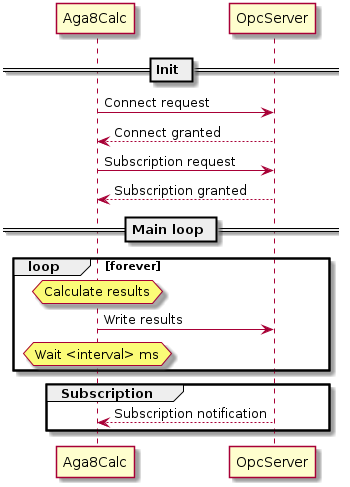
Sequence Diagram